

MDict
durch Rayman Zhang

MDict
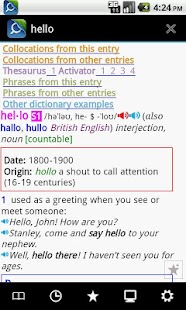
It doesn't have built-in dictionary data, but it's a open platform that you can find a lot of database files built by other user, including wikipedia.Notes: You need to put database files into /mnt/sdcard/mdict/doc directory.Features:1.
Lots of dictionaries(File extension ".mdx") ,You can make dictionary databases yourself.2.
Can lookup multi-dictionaries at the same time3.
Can lookup words by touch
About MDict
- Package name (App ID)
- cn.mdict
- Available on
- Google Play
- Price
- Free
- Version
- v2.1.12
- Updated
- February 10, 2019
- Developer
- Rayman Zhang
Looking for the MDict APK?
The safest way to get MDict (cn.mdict) on your Android device is to install it directly from Google Play — you'll always get the latest official version, automatic updates, and no risk of modified or infected APK files from third-party sites.

Food & Dining
Discover recipes and order food from your favorite restaurants.
Automotive
Manage and monitor your vehicle with smart features.
MDict in Aktion sehen

Was unsere Nutzer sagen
Verlassen Sie sich nicht nur auf unser Wort. Hier ist, was unsere Nutzer ueber diese Android-App sagen.
"Great. Especially custom dictionaries and community of mdd sharer on the forum. Only needing an built in exporter or sync api for both the mobile app and desktop computer application."
"Perfection"
"I am teacher and also student in university"
"Don't know how to use it"
"Nothing works here! I cannot access any folder. Where are dictionaries? How do we get them? What type of dictionary files do we need to download and where ? ... In conclusion, we have something here that looks like a shiny car, but, alas, there is no engine under the hood. 👎"
"The BEST dictionary app!!"
"Needs lots of visual tweaks to look modern. It's very outdated."
"It doesn't work on Android 11,a52s, force close"
"Bad UI, limited functionality, and worst of all very few dictionaries are available. I recommend colordict instead."
"will use it forever!"
Frequently Asked Questions
Is MDict free?
Yes, MDict is free to download and install on Android through Google Play.
How do I install MDict on Android?
Open Google Play on your Android phone or tablet, search for MDict by Rayman Zhang or tap the Google Play button on this page, then tap Install. The app downloads and installs automatically.
What is cn.mdict?
cn.mdict is the App ID (package name) of MDict on Google Play. Every Android app has a unique package name, and it is the safest way to verify you are installing the official app.
Is MDict safe to download?
Installing MDict from Google Play is the safest option: you get the official version published by Rayman Zhang, verified by Google Play Protect, with automatic updates. Avoid APK files from unofficial third-party sites.
Get MDict Today
MDict for Android — free download on Google Play.
Compatible with Android phones and tablets — available on Google Play.
Frag die KI zu dieser App
Erhalte sofortige Antworten zu Funktionen, Tipps und mehr.